Ask: policy search.
The demo starts here. One assistant, a question about a policy, an answer from the documents you're allowed to see with the source cited, and a persona switch that changes the answer. Everything else in the assistant starts from this same conversation.
An employee should not have to figure out where to go.
A question about carryover means finding the handbook. A request for time off means finding the form. A question about parental leave means finding HR, and hoping the answer applies to your country. Three doors, and the employee has to pick the right one before they have even asked.
The bar is one place. Type the question, or the request, and get the answer, or the thing done, from an assistant that already knows who you are and what you are allowed to see. The employee never has to know whether what they typed was a "search" question or a "workflow" question. That is the assistant's job, not theirs.
One front door.
Acme Assistant is a ChatGPT-style workspace on top of a mock HR system and a small policy library. The left rail has a persona switcher, one Ask thread, and the panels that aren't chat: the policy library, my requests, team approvals for a manager, and an org overview for HR. Everything starts in Ask. An orchestrator reads each message, decides the intent, and hands the turn to the use case that owns it: policy search, the time-off agent, the parental leave agent, the manager agent, or the help agent. Some messages never get that far: the stop rule takes an ethics report out of the queue before anything is searched. Each agent gets only its own tools. The reply says which path ran, and the first line of the trace, the list of steps under every answer, says why.
The personas are the demo. Switching from Alex to Jordan to Bob changes three things at once: which panels exist, which documents are searchable, and what the same question returns. Nothing about that is a setting. It falls out of the access model and the routing.
| Persona | Who | Sees that others don't | Extra panel |
|---|---|---|---|
| Alex | Full-time engineer, US | Engineering on-call policy | none |
| Priya | Part-time designer | Prorated balances at six hours a day | none |
| Marcus | Contractor | Code of conduct only, no PTO policy at all | none |
| Sarah | Engineer, California | US leave supplement, 16 weeks plus FMLA | none |
| Ananya | Engineer, Bengaluru | India leave supplement, 26 weeks | none |
| Jordan | Engineering manager, US | Executive equity plan | Team approvals |
| Rohan | Engineering manager, Bengaluru | India leave supplement; Ananya's requests | Team approvals |
| Bob | HR business partner | Compensation bands | Org overview |
Ask, and see where the answer came from.
Signed in as Alex, a full-time engineer, the first question is about carryover. The answer is the policy text itself, with the section it came from, and above it the line that matters: which documents were searched for him. Expand it and the trace shows who asked, the access check that ran before the search, and the passage that won.
Checked access · 6 documents apply to you
Carryover. You may carry over up to 5 unused PTO days into the next calendar year. Days beyond the cap are forfeited on December 31 and are not paid out. PTO Policy
OrchestratorIntent: policy question (default: no rule matched; a question for the policy library by default). Routed to policy search.Resolved who's askingalice@corp.com · groups: all-employees, employees-us, engineeringChecked access before searching6 documents in scopeSearched the allowed documentsembedded the question, ranked 6 documents by meaning (relevance floor 0.26)Found the passagePTO Policy · relevance 0.362 · shares carry, over, pto with the questionAnswered from that text onlycited PTO Policy
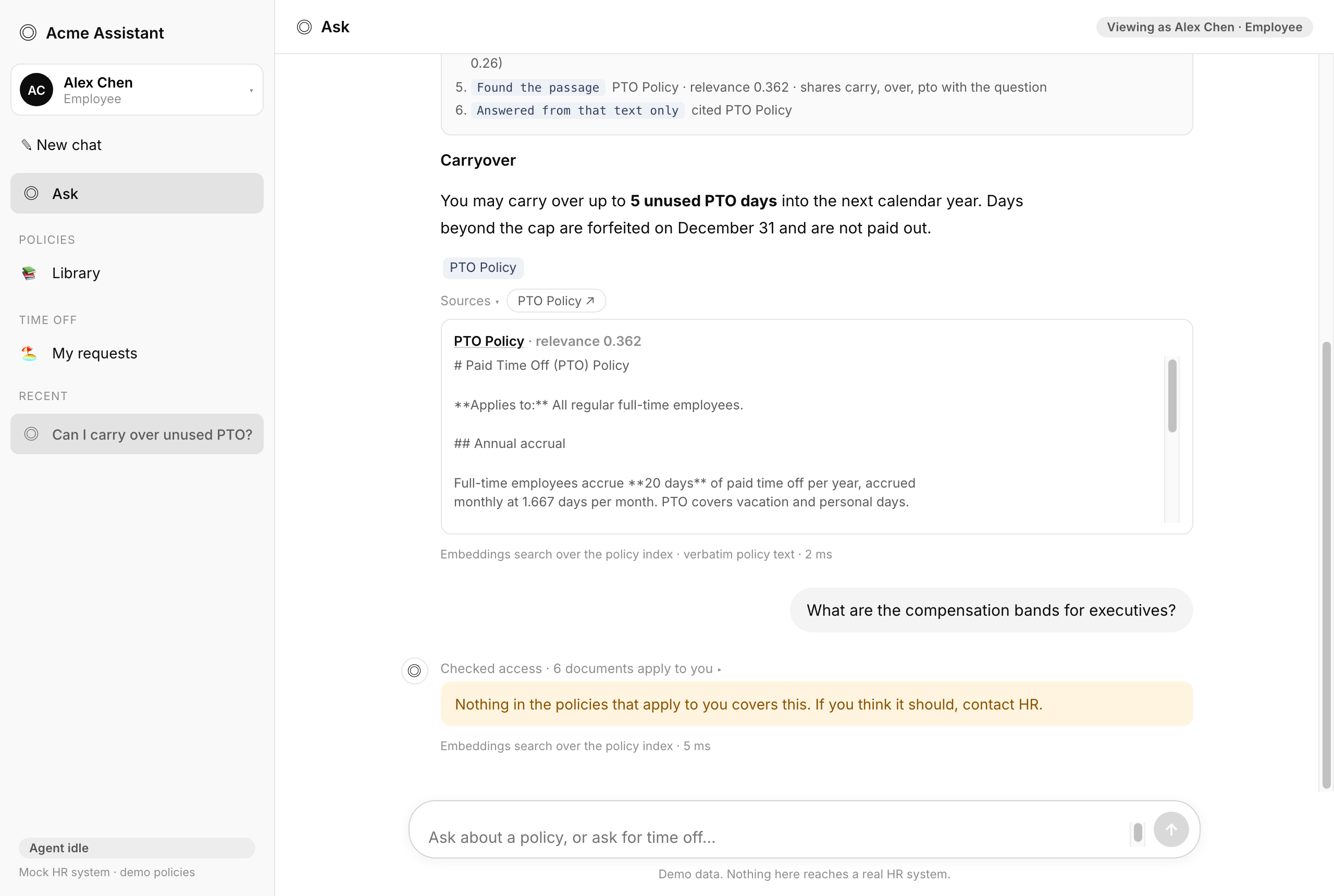
The second question is the one that proves the point. Alex asks for the executive compensation bands. That is an HR document, so it isn't among the documents he has access to, and the answer says so without saying anything else. Not "that's restricted." Not "4 of 6 documents." Just: nothing you can see covers this.
Checked access · 6 documents apply to you
Nothing in the policies that apply to you covers this. If you think it should, contact HR.
Switch to Bob in HR and the same words get the bands, Director through Senior Vice President with the section they came from, because HR admins are the one group the document is shared with. Switch to Jordan, the manager, and it misses again: he approves his team's time off, and executive pay is not his to see. Same assistant, three different sets of access. The persona table above is the whole demo in one place.
One front door. This chapter is the search behind it.
The employee talks to one assistant. An orchestrator works out what they want. A policy question comes here, to search. A request to do something goes to the agents in use cases 02 and 03. Search has no tools of its own and changes nothing. It reads, checks, and answers.
This agent calls no tools at all: the access filter, the passage, an answer from it. Nothing in this chapter writes to any system, which is why search can sit in front of everything else. It is the safe first thing to ship. The agents in 02, 03 and 04 do the acting.
The guardrails, and the test that proves each one
Each rule below says where it lives in the code, what you see when it stops something, and the test that would fail if it broke.
| The rule | Where it lives | What you see | Proof |
|---|---|---|---|
| You never get an answer from a document you cannot open | the access filter runs before the search, in server/policies/index.ts | The trace names the documents in scope and the ones locked. Locked text never reaches the model. | access-01access-02access-03 |
| If nothing you can read covers it, it says so | server/policies/answer.ts abstains when no passage you may see matches | It says it does not know and points you to HR, with no hint of what else exists. | access-04access-05 |
| Planted text never crosses a persona | each document carries the groups it came with, and the filter uses those | Strings planted in the locked documents never show up for the wrong person. | access-06 |
| Every answer names where it came from | the answer is written from one retrieved passage and returned with its source | The document and section sit under the reply. | library-01library-02 |
| Some reports are stopped before anything is searched | the stop rule in server/agents/sensitive.ts, run in front of the router | Harassment, retaliation or a person in crisis: it names the ethics line, the HR business partner and the EAP, and writes no ticket and no draft. | sensitive-01sensitive-05 |
| Asking what a policy says is still a policy question | a lookup guard runs before the stop list, so wording about a document is never caught | “Where is the anti-harassment policy” is answered from the document. Only a report trips the rule. | sensitive-02 |
| A report that never names the category still stops | a second layer looks for a report verb near a sensitive object, so the sentence does not have to say “harassment” | “I want to report a safety concern” and “how my team lead treats people” both stop. The list is words, owned by HR and legal; a classifier belongs behind it. | sensitive-06sensitive-07 |
| Consent has to answer the question | the handoff takes a short yes at the start of the reply, and anything else cancels the offer | “How do I submit an expense report?” after the offer opens no chat. It gets answered as the question it is. | sensitive-09 |
| The ordinary uses of “report” are left alone | an exclusion list runs first: expense reports, status reports, who you report to, direct reports | Asking who you report to gets an answer, not a handoff. Over-blocking is the failure mode that matters. | sensitive-08 |
| A handoff to HR is not visible to IT | the chat is opened with an HR route and filtered out of the support queue | Bob is asked to join. Sam never sees the chat, and nothing the employee typed is copied into it. | sensitive-03 |
| Pay and accommodation get the process, not a ruling | the second branch of the same rule | It explains how a payroll correction works and who owns it, then offers HR. It decides nothing. | sensitive-04 |
| Asking to do something is not a search | the orchestrator picks the route first, and the first line of the trace says why | “Book a vacation” goes to the time-off agent. “What is the notice period” stays here. | routing-03routing-04 |
The flow, in six steps.
-
You sign in once.
Through the company's sign-in. The assistant learns who you are, where you are based, and which groups you belong to. In the demo, a persona switch stands in for this and keeps the same groups.
-
You ask.
"Can I carry over unused PTO?" The orchestrator sees a question rather than a request and sends it to search. Had you typed "I want to book a vacation," it would have gone to the time-off agent instead. You never choose.
-
Search checks what you can see, before it searches.
The library is filtered to your groups first, then searched by meaning, or by the question's own words when it is too short to search by meaning. Filter after searching and the model has already seen what it shouldn't. Filter first and it fails closed. This is the one decision the whole chapter hinges on.
-
You get the passage, the source, and the reason.
The answer is the policy text itself, the section it came from, and the line "Checked access · 6 documents apply to you." When nothing you can see covers the question, it says exactly that, with no hint of what else exists.
-
Sometimes the right answer is a person, and no record.
A harassment report, a retaliation claim, someone in crisis: the stop rule catches it before anything is searched. It names the ethics line, the HR business partner and the EAP, and offers to bring that person into this window. It writes no ticket and keeps no account of what was said, because a narrative like that has no business sitting in a ticket table that IT support can read. A pay dispute or an accommodation request is different: there the assistant explains how the process works and who owns it, and decides nothing.
Where the policies come from.
In the demo the policies are ten files in a folder. In a real company they live in three or four systems, and each one has its own idea of who may read what. The search does not change. The connectors do. Ingestion is a pipeline that runs ahead of time, not a tool the agent calls, so this is the policy-search equivalent of the MCP and A2A section in the time-off chapter.
| Source | What lives there | Read it with | Permissions come from | Keep it current |
|---|---|---|---|---|
| SharePoint, OneDrive | The handbook, policy PDFs and Word files, most HR document libraries | Microsoft Graph: drive items for the files, the permissions endpoint for who may open each one | The file's real sharing settings, mapped to groups | Graph delta queries, which also flag items whose permissions changed |
| ServiceNow | Knowledge articles in the HR knowledge base | The Table API on the knowledge article table, published articles only | User criteria on the knowledge base and on individual articles | Query by updated-on since the last run |
| Workday Help | Knowledge articles employees see inside Workday | The help article endpoint, filtered to published articles; structured policy data through a report enabled as a web service | Article audiences, mapped to groups | Re-pull published articles on a schedule |
| SAP SuccessFactors | Policy documents attached in Employee Central, or a document management add-on | OData v2, the attachment and document entities | Role-based permissions in SuccessFactors, mapped to groups | Query by last-modified since the last run |
| Google Drive (built, below) | Team policies that never made it into HR's system; in the demo, all ten | A Google Drive MCP server: list the folder, read each file, read its sharing settings | The file's sharing settings, read from Drive | Drive change feed, or re-read the folder |
| Confluence | Engineering runbooks and team norms | The REST API, page plus its restrictions | Space and page restrictions | Last-modified since the last run |
Every connector produces the same three things per document: the text, the list of groups that may read it, and a few facts such as country and last updated. That is all the index ever needs, whatever the source. The identity provider, Entra ID or Okta, is where the groups on both sides get their names.
One connector, built for real: Google Drive over MCP.
The table above is a design. This part is not. The ten policies also live in a real Google Drive folder, and a connector reads them the way a production one would: it asks a Google Drive MCP server for the files in the folder, reads each one, and reads each file's sharing settings. The sharing settings become the document's access list. Nothing is typed in by hand. If HR shares a document with one more person in Drive, the next sync picks that up, and that person can find it.
Two things had to be true for this to count. First, the connector is a real MCP client. It speaks the protocol over the server's standard input and output, and the same code runs against any Drive MCP server that exposes list, read, and permissions tools. Second, the demo could not rely on my own access. So the sync runs as the account that owns the folder, and the check below asks as each account Drive granted, and as one it did not.
Synced from the Drive folder through the Google Drive MCP server: 10 documents, 13 passages. Sharing settings were read from Drive, not typed in.
| Document in Drive | Who Drive says may open it |
|---|---|
| Code of Conduct | Alex Chen, senior engineer (US) (reader), Folder owner, runs the sync (owner) |
| Compensation Bands · canary | Folder owner, runs the sync (owner) |
| Engineering On-Call Policy | Alex Chen, senior engineer (US) (reader), Folder owner, runs the sync (owner) |
| Executive Compensation Bands · canary | Folder owner, runs the sync (owner) |
| Executive Equity Plan · canary | Folder owner, runs the sync (owner) |
| Leave of Absence Procedure | Alex Chen, senior engineer (US) (reader), Folder owner, runs the sync (owner) |
| Parental Leave Policy | Alex Chen, senior engineer (US) (reader), Folder owner, runs the sync (owner) |
| India Leave Supplement | Folder owner, runs the sync (owner) |
| US Leave Supplement | Alex Chen, senior engineer (US) (reader), Folder owner, runs the sync (owner) |
| PTO Policy | Alex Chen, senior engineer (US) (reader), Folder owner, runs the sync (owner) |
Then the check. For every account Drive granted, plus one it never granted, ask seven questions that between them touch every document, and confirm nothing comes back from a document that account may not open.
| Asking as | May open | Passages came from | Result |
|---|---|---|---|
| Alex Chen, senior engineer (US) reader | 6 of 10 | 5 | no leak |
| nobody@example.com no grant | 0 of 10 | 0 | no leak |
| Folder owner, runs the sync owner | 10 of 10 | 8 | no leak |
No document was retrieved for anyone Drive had not granted. The report itself is published here and regenerated by scripts/drive_sync_report.py after every sync.
What I learned building it. Google Docs come back from the server with markdown escaped, so a heading arrives as \#. A four-line cleanup fixes it, and without it the passages index badly. A personal Drive has no groups, only people, so the demo grants are to individual accounts. A company Drive would share with groups, and the connector already maps a group grant to a group on our side, the same name Entra ID would give it. And the folder's owner can open everything, which is right for the account that runs the sync and wrong for an employee, so the owner is a separate line in the check rather than a persona.
The connector is rag/connectors/mcp_drive.py in the demo repository. It has two entry points: a live sync that spawns the server, and a manifest path for a client that already has Drive connected. The demo index on the public site is still built from the local folder so every persona keeps working; switch the ingest flag and it is built from Drive instead.
Three rules that hold across all of them. Read the permission with the document, never in a separate pass, so the two cannot drift apart. Sync what changed, not everything, so a handbook edit shows up within the hour instead of overnight. And when a document's permissions change, re-index it immediately, because a policy that was widened is a policy someone new may now ask about, and one that was narrowed is a leak waiting to happen.
What has to be true, and how I check it.
The suite has 67 cases and runs on every change. Twenty-three of them are about this front door: six for routing, six for access, two for the library, and nine for the stop rule. They answer the questions a buyer would ask. Does "what are the compensation bands for executives" go to search, and "I want to book a vacation" to the agent? Can a policy question and a time-off request share one thread? Does each persona search exactly the documents they have access to, and no more? Do the canary strings, unique phrases planted inside the compensation bands and the executive equity plan so that a leak is provable, ever appear for Alex, Jordan, or Bob? Does the local fallback library obey the same rule as the search layer? Does a harassment report stop before any of this runs, while “where is the anti-harassment policy” still gets answered? The no-leak assertion runs on every persona in every case, and a single locked title, count, or canary fails the run. The latest run passes all 67. The full method is in the evals chapter.
The twenty-three cases for this front door fall into four groups. Each case is a sequence of steps as a named persona, and the checks run on the reply's structure, not only its text: which path ran, which documents they had access to, whether anything outside that was named, flagged, or counted.
Read the suite, case by case. Or the source: test-cases.ts and golden_policy_search.json
| Group | Cases | What they hold the front door to |
|---|---|---|
| Routing | 6 | A question goes to search and a request to the agent. Phrasings on both sides. A stray yes with nothing drafted submits nothing. One thread can hold both. |
| Access | 6 | Each persona searches exactly what they have access to: Alex, Jordan, Bob, Marcus, Priya. The canaries never reach the wrong person. |
| Library | 2 | The document list obeys the same rule, on the search service and on the local fallback. |
Underneath the assistant's cases sits a golden set for the search itself: 47 questions, one expected outcome each, across all ten documents and all nine personas. Twenty-nine are in scope and name the document and the fact the answer must contain. Nine are denied: the document exists and this person may not see it, so the answer must abstain, say it has nothing rather than guess, and must not name it, quote it, or surface its canary. Three ask the same question from the other country, three are paraphrases, and three are about things no policy covers. It is data, not code, so HR can read and extend it, and a runner scores it against the search exactly as employees use it. The day it was written it passed 34 of 47. Every denied, cross-country, and canary case held, with zero leaks. What failed was quality, not safety: three paraphrases that share no words with the policy, two on-call questions the offline embedder cannot place, and a handful where the right document came back with the wrong section shown. That is the honest state of a portable demo with no embedding model behind it, and it is the list a production embedder has to clear. The search layer also reports retrieval precision and recall and a model judge whose grading is checked against hand-labeled answers.
One number: the question that never becomes a ticket.
Policy search is accountable for one number. The share of policy questions that end in the thread, answered from a document the asker may see, with no ticket behind them. Recall and precision are levers I pull to move that number. They are not the number.
The saving is HR time, and it repeats. A carryover question costs someone a few minutes to read, look up and answer, then arrives again next month in different words. Here the answer comes out of retrieval, so the only model call in the turn is the router that decided where to send it. That call cost two hundredths of a cent in a traced run.
A system that answers everything scores well on deflection and tells a contractor what the executive band pays. So resolution counts only while the leak rate is zero and nobody is blocked from a document they are entitled to. A wrong answer does not remove a ticket. It moves the ticket somewhere more expensive.
The arithmetic, with your headcount and your ticket volume in it, is on the business case.
Personas are a better nav than features.
Organize by who's asking, not by domain.
The first rail grouped things as Ask, Do, Decide, Oversee. It read well and meant nothing to an employee. Approvals and the org view are steps in the time-off flow, so that's where they live now, and the persona decides which steps you see.
Search is a capability, not a destination.
I had "Policy search" as its own entry for a week. Nobody picks a use case called search. They ask a question. Folding it into Ask made the routing the showcase instead of the menu.
Filter first, then retrieve.
You can search everything and hide what the person can't see, or hide it first and search what's left. They sound the same. Only the second fails closed, and in security the direction of failure is the whole game.
Never show a lock.
The first version listed locked documents with a padlock, and the trace said "4 of 6 documents visible." It looked like a security feature. It was a leak. Now nothing outside your scope is named, flagged, or counted, anywhere. The demo got less flashy and more honest.
How to build this yourself.
Enough to run it yourself, in five steps. The prompts get you moving; your documents and your judgment make it real.
-
Write a one-page spec, then start with the riskiest question.
Not the whole thing. One page: who asks, what each of them may see, which actions write and which only read, and what must never happen. Then build the thinnest version that proves the one thing that could sink it: a user can never retrieve content they can't access.
PromptHere are the people who will use this and the documents they may see. Write a one-page spec: users, what each may read, what must never happen, and the one test that would prove a leak. Then help me build the thinnest version of permission-aware RAG that proves one thing: a user can never retrieve content from a document they can't access. What's the smallest test that would prove or break that?
-
Model access as a list on every chunk.
Attach who-can-see-this to every chunk. Retrieval returns chunks, so the check has to live there, and the document alone is too coarse.
PromptDesign a small access-control model I can attach to every chunk, plus one function that decides whether a given user may see a given chunk.
-
Filter before you retrieve.
Apply the access check to the candidate set before ranking, so restricted chunks are never scored or returned. Filtering after retrieval fails open.
PromptApply the access check to the candidate set before ranking, so restricted chunks are never scored or returned, and explain why filtering after retrieval would be unsafe.
-
Ground the answer and let it abstain.
The model uses only the retrieved chunks, cites the source, and says "I don't have that" when nothing relevant came back.
PromptWrite the answer step so the model uses only the retrieved chunks, cites the source, and abstains when nothing relevant came back.
-
Build the first connector.
Start with wherever most policies actually live, usually SharePoint. A connector does three things and nothing else: read the text, read who may open the file, and note a few facts such as country and last updated. Then it asks only for what changed. Everything downstream is the same whether the source is SharePoint, ServiceNow, or Workday, so the second connector is a copy of the first with a different API behind it.
PromptDesign a SharePoint connector that returns, per document, the text, the groups allowed to read it from its real sharing settings, and a little metadata, using a delta query so only changes are re-read. Show the same interface for ServiceNow.
-
Prove it with canaries and an eval.
Hide a unique phrase in each restricted document, then fail the run if an unauthorized user ever pulls it out. Score retrieval separately.
PromptPut a unique canary string in each restricted document, write cases where an unauthorized user tries to extract it, and fail the run if any canary appears. Score retrieval separately with precision and recall.
Definitions, in plain language.
Worth your time.
- Introducing Contextual Retrieval
Anthropic. How to make the retrieval half of RAG a lot more accurate.
- Building Effective Agents
Anthropic. Where retrieval fits in the bigger picture: a model that uses tools on feedback, over and over.
- Demystifying evals for AI agents
Anthropic. How to know whether an output is actually good, instead of trusting instinct.
- Use case 02: Parental leave
The same question from Bengaluru and from California, answered from the right documents and turned into a request.
- Use case 03: Time off
Balance, policy, holidays, coverage, a draft, a yes, and a manager who approves from chat.
- How I knew it worked
67 cases across personas, and the no-leak assertion that runs on every one.
Use case 01 of four. Next: parental leave →