Get help: the article, the ticket, the person.
Something at work is broken. The assistant offers the fix first, logs a ticket only when the fix fails, shows the support agent the cases like it, and turns the answer into an article. When the employee needs a person, the same thread becomes the chat.
Five tickets, one cause, and nobody noticed.
An employee whose laptop keeps freezing does four things today: searches the knowledge base, gives up, opens a ticket, and waits. The ticket lands in a queue next to five others that describe the same thing in different words, and nobody sees that they are one problem. The support agent answers each by hand. The fix never becomes an article, so next week the same ticket arrives again.
Three people want three things. The employee wants to try the fix and, if it fails, hand the problem to someone who owns it without leaving the window they are in. The support agent wants to know whether they have seen this before, and to stop answering it. The employee who is stuck wants a person, now, in the same thread. This use case is the same shape as IT Assist at Kore.ai, which I ran: deflect with a known fix, else file a ticket the employee can track, and let a person step in when they must.
Say what is broken. The fix comes first, the ticket second, the person when you ask.
Type "my laptop is not working" and the assistant checks which knowledge base articles you may see, offers the one that matches with its steps, and asks whether it worked. Say it did not and it drafts a ticket that already carries what you tried, so IT does not ask you to do it twice. Say yes and the ticket is logged in the queue. On the other side, Sam in IT opens the ticket and the assistant names every ticket like it from the last two weeks, with the cause from the ones already resolved, and offers to draft the article. Sam publishes it with a yes, the open tickets get the link, and the next employee who types the same words gets the new article instead of the old one. Ask for a person and the thread becomes a live chat with Sam, the ticket attached, and a suggested reply drafted for him.
Watch: a two-minute walkthrough of the three flows, Alex, Sam, Priya, and the live chat, captured from the running demo. Narration by Gemini (Zephyr). Captions are under the CC button.
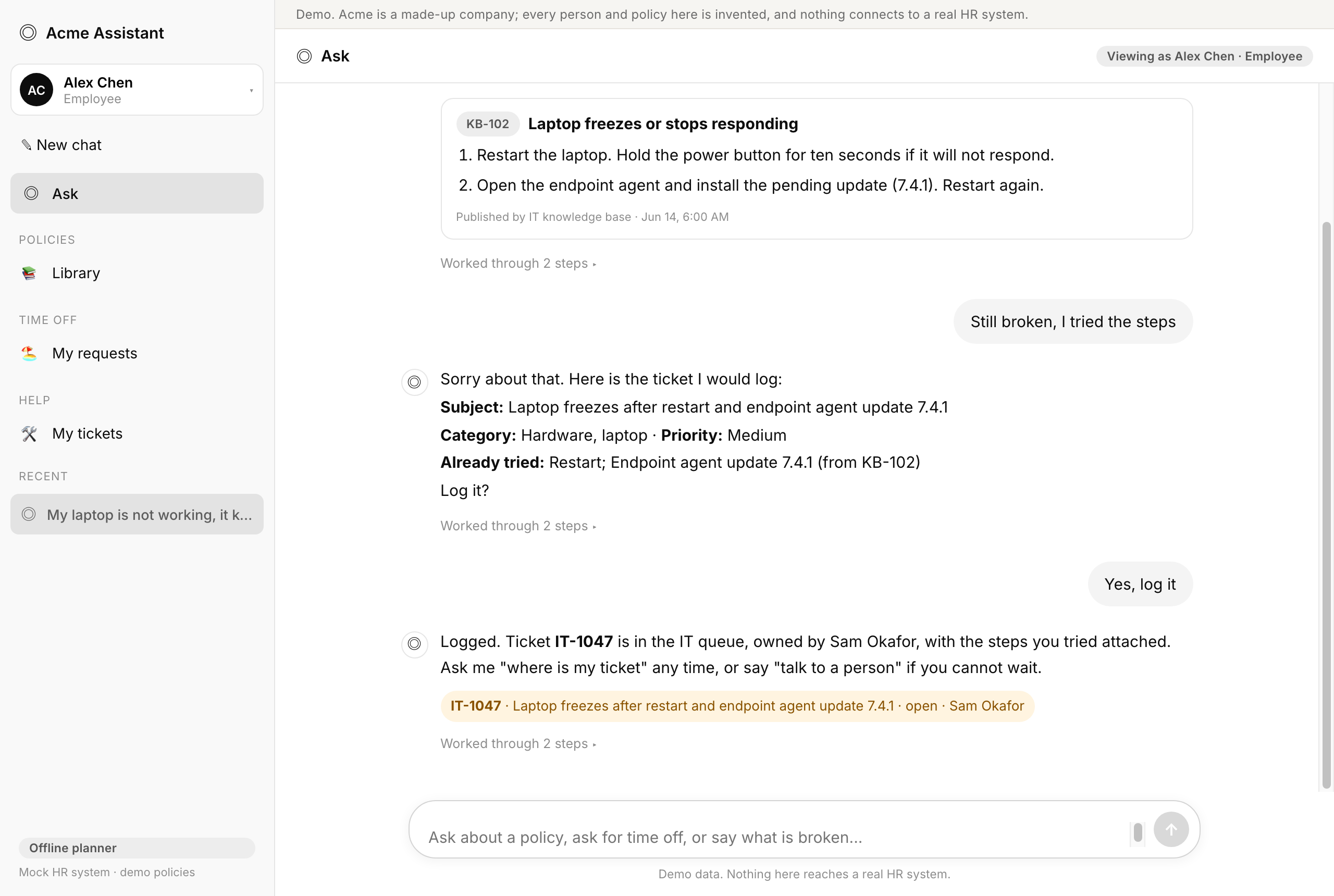
The knowledge base has an article that matches: Laptop freezes or stops responding KB-102. Two steps, about five minutes. Try them and tell me whether it worked. If it does not, I will log a ticket with what you already tried, so IT does not ask you to do it twice.
The article card under the reply lists the two steps, restart and install the pending endpoint agent update 7.4.1, with two buttons: It worked, Still broken.
orchestratorIntent: it request (rule: matched "laptop"). Routed to the help agent.search_kbChecked access: 7 articles apply to Alex Chen; 1 match
Sorry about that. Here is the ticket I would log:
Subject: Laptop freezes after restart and endpoint agent update 7.4.1
Category: Hardware, laptop · Priority: Medium
Already tried: Restart; Endpoint agent update 7.4.1 (from KB-102)
Log it?
orchestratorIntent: it request (session: an article was offered and this reports how it went). Routed to the help agent.propose_ticketDrafted a Medium Hardware, laptop ticket carrying 2 tried steps; waiting for a yes
Logged. Ticket IT-1047 is in the IT queue, owned by Sam Okafor, with the steps you tried attached. Ask me "where is my ticket" any time, or say "talk to a person" if you cannot wait.
orchestratorIntent: confirm (session: a help draft is waiting and this reads as a yes). Routed to the help agent.submit_ticketLogged IT-1047 in the ticketing system, owned by Sam Okafor; 2 tried steps attached
The support side. Sam Okafor is the ninth persona, IT support. His thread and his queue are the other half of the story.
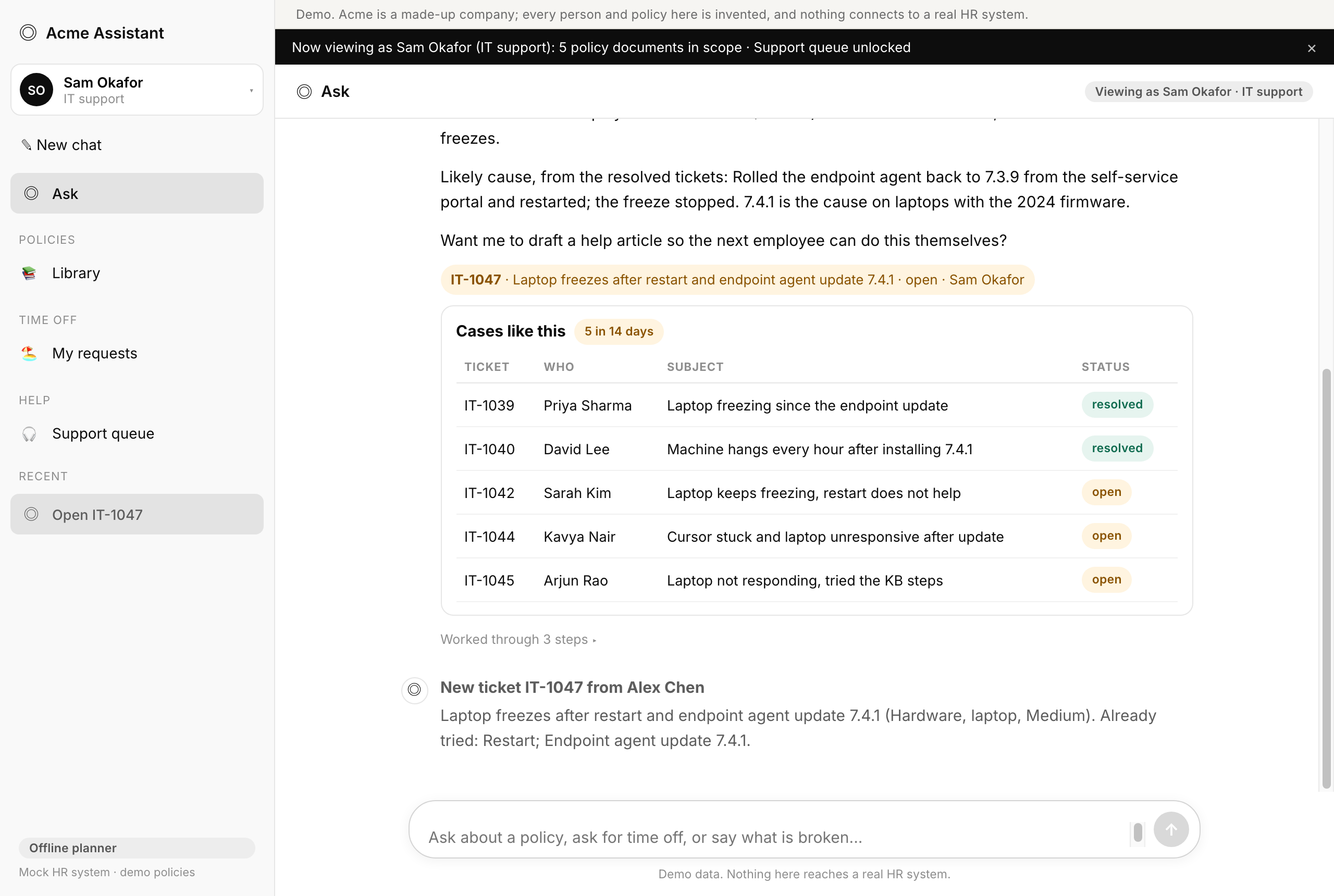
IT-1047, Alex Chen, "Laptop freezes after restart and endpoint agent update 7.4.1", Medium, opened just now, open. Already tried: Restart; Endpoint agent update 7.4.1. Offered KB-102 first.
5 other tickets in the last 14 days look like this (same category, same symptom, every one mentions the endpoint agent 7.4 update): 2 resolved, 3 still open. IT-1039 Priya Sharma, IT-1040 David Lee, resolved; IT-1042 Sarah Kim, IT-1044 Kavya Nair, IT-1045 Arjun Rao, open.
The article these employees were offered (KB-102) tells them to install 7.4.1, which is the version that freezes.
Likely cause, from the resolved tickets: Rolled the endpoint agent back to 7.3.9 from the self-service portal and restarted; the freeze stopped. 7.4.1 is the cause on laptops with the 2024 firmware.
Want me to draft a help article so the next employee can do this themselves?
orchestratorIntent: it request (rule: support role and matched "IT-1047"). Routed to the help agent.open_ticketOpened IT-1047 (Alex Chen, Hardware, laptop, Medium)find_similar_tickets5 tickets in the last 14 days share the category and a symptom tag
Draft article:
Title: Laptop freezes after endpoint agent 7.4.1: roll back to 7.3.9
Applies to: everyone · Symptom: laptop freezes or stops responding after the 7.4.1 update
Steps: 1. Open the self-service portal and choose Endpoint agent, then Versions. 2. Select 7.3.9 and install it. This takes about two minutes. 3. Restart the laptop. If it freezes again after the restart, log a ticket and say "rollback done".
Replaces: KB-102
Publish it? It goes to the knowledge base, and the 4 open tickets on this get a reply with the link.
orchestratorIntent: it request (rule: support role and matched "article"). Routed to the help agent.propose_articleDrafted an article from the resolved cases; 4 open tickets would get the link; waiting for a yes
Published KB-108. Replied on IT-1047, IT-1042, IT-1044, IT-1045 with the article; each requester was notified. KB-102 now points to it. The tickets stay open until each employee confirms.
orchestratorIntent: confirm (session: a help draft is waiting and this reads as a yes). Routed to the help agent.publish_articlePublished KB-108 to the knowledge base; KB-102 now points to itreply_on_ticketsReplied on 4 tickets with the templated note; each requester notified
The loop closes. Priya, who filed one of the first tickets, types the same words a week later and gets the new article, not the one that caused the problem. Alex, who still has IT-1047 open, gets the same article and an offer to close the ticket with "it worked".
There is a new article for exactly this, published by Sam Okafor just now: Laptop freezes after endpoint agent 7.4.1: roll back to 7.3.9 KB-108. 3 steps. Try them and tell me whether it worked. If it does not, I will log a ticket with what you already tried, so IT does not ask you to do it twice.
orchestratorIntent: it request (rule: matched "laptop"). Routed to the help agent.search_kbChecked access: 8 articles apply to Priya Sharma; 1 match
Live help. When the employee asks for a person, the assistant asks once, then the thread changes hands. Sam sees the chat in his queue with the ticket attached, and a reply drafted from the ticket and the article sits in his composer. Nothing is sent until Sam sends it.
I can connect you with IT support now. Your ticket IT-1047 and what you tried go with you, so you will not repeat yourself. Connect?
orchestratorIntent: it request (rule: matched "Talk to a person"). Routed to the help agent.get_my_ticketsOpen ticket IT-1047 will travel with the chat
You are in the live help queue, with IT-1047 and what you tried attached. Sam Okafor will join here; keep typing in this thread and they will see it. Say "end chat" when you are done.
Sam joins from the Support queue. His composer holds the suggested reply, labeled as drafted by the assistant from ticket IT-1047 and article KB-108: "Hi Alex, I see you tried the 7.4.1 update. That version is the cause. Open the self-service portal and choose Endpoint agent, then Versions. Select 7.3.9 and install it. This takes about two minutes. Then restart. Article KB-108 has the steps." He sends it, and it appears in Alex's thread as a message from Sam Okafor, IT support.
orchestratorIntent: confirm (session: a help draft is waiting and this reads as a yes). Routed to the help agent.request_live_helpOpened CHAT-1 with IT-1047 attached; waiting for an agent
Relayed to Sam, not answered by the agent. Sam clicks Resolve IT-1047 in his queue; Alex's thread shows "Resolved IT-1047" from Sam and the ticket turns resolved under My tickets.
orchestratorIntent: it request (session: live help is open, so this goes to the person). Routed to the help agent.send_live_messageRelayed to Sam Okafor
Captured from the running demo. The seed resets on every run, so the ticket is always IT-1047 and the article is always KB-108; "opened just now" and "8 days ago" move with the clock.
Same front door. A fifth agent, three mock systems, and one request ID across them.
Nothing new in the shape. The orchestrator hears a broken thing, a ticket, or a request for a person and hands the turn to the help agent. The agent is deterministic in both modes, because every write it makes is gated and a ticket or a published article should not depend on a model. What is new is the integration: the article offered, the ticket, and the live chat share one request ID, so "where is my ticket" reads all three.
search_kbarticles your groups may see, filtered before rankingget_my_ticketsyour own tickets, never anyone else'spropose_ticketdrafts the ticket with what you tried and which article was offered. Submits nothingsubmit_ticketwriteopens the ticket in the queueclose_ticketwritecloses it when you say the fix workedrequest_live_helpwriteopens a chat with the ticket attachedreply_on_ticketwriteputs your "still broken" note on your own open ticket, so the owner sees what you triedsend_live_messageyour message into that chatend_live_chatwriteends it
open_ticketthe ticket with what the employee tried and which article was offeredget_queuethe open queue, IT support onlyfind_similar_ticketsresolved tickets with the same causepropose_articledrafts the article from those resolutions. Publishes nothingpublish_articlewritepublishes it, visible on the next messagereply_on_ticketswritereplies on every open ticket the article answers and notifies each requester, in a fixed template
The assistant is the integration. Today the "integration" between these tools is a person copying a ticket number into a chat message. Here the ticket carries what the employee tried and which article was offered, the article carries which tickets it answered, and the chat carries the ticket.
The guardrails, and the test that proves each one
Each rule below says where it lives in the code, what you see when it stops something, and the test that would fail if it broke.
| The rule | Where it lives | What you see | Proof |
|---|---|---|---|
| The article comes first, and no ticket until you say it did not work | a fixed order in server/agents/help.ts | The first reply offers the article and logs nothing. | help-01help-11 |
| Nothing is logged without a yes | the same gate as the other agents, on submit_ticket | “Sounds good, maybe later” writes nothing. | help-04help-05 |
| You see your own tickets and nobody else’s | requester scope on get_my_tickets and open_ticket | Asking for someone else’s ticket is refused. | help-07 |
| Only IT support works the queue | role gate on the queue, similar cases, chats and publishing | An employee cannot join a chat, reply on a ticket, or publish an article. | help-10 |
| Articles follow the same access rule as policy search | canSeeArticle in server/helpdesk/kb.ts | The contractor gets no employees-only article, and the same abstain wording. | help-03 |
| Live help waits for a yes too | request_live_help opens a chat only after you confirm | The ticket goes with you into the chat. | help-09 |
| The note that goes out on publish is a fixed template | templated text in server/agents/help.ts, not written by the model | Every matching ticket gets the same wording with the article title and ID. | help-08 |
The tool spec: all fifteen tools, what each one does, and the guard on it
| Tool | Reads or writes | Tier | Guard |
|---|---|---|---|
| search_kb | reads articles the employee may see | T0 | ACL filter before ranking, the same code path as policy search |
| get_my_tickets | reads own tickets and replies | T0 | requester scope. Sam and Bob read the queue |
| propose_ticket | writes a session draft | T1 | category from a fixed list, priority Medium unless asked, tried steps copied from the article offer |
| submit_ticket | writes to ticketing | T2 | needs a draft and a yes in the latest message |
| close_ticket | writes status | T2 | requester or owner only. “It worked” on an open ticket counts as the yes |
| reply_on_ticket | writes the employee’s note onto their own open ticket | T2 | the requester’s own open ticket. The note is the employee’s message, not model-written |
| request_live_help | writes a waiting chat | T2 | needs a yes. Attaches the open ticket if there is one |
| send_live_message | writes to the chat | T1 | either party, only while the chat is active |
| end_live_chat | ends the chat, the ticket stays as it is | T2 | either party, only while a chat is open |
| open_ticket | reads one ticket plus similar open tickets | T0 | it_support or hr_admin only |
| get_queue | reads every open ticket, oldest first, plus who is waiting | T0 | it_support only. An employee never sees the queue |
| find_similar_tickets | reads tickets sharing category and symptom tags in 14 days | T0 | it_support only. Requester names shown, nothing else personal |
| propose_article | writes a session draft | T1 | title, symptom and steps from the resolved tickets’ notes |
| publish_article | writes to the knowledge base | T2 | needs a draft and a yes |
| reply_on_tickets | replies on every open ticket the article answers, notifies each requester | T2 | runs only inside publish, after its yes. The reply is a fixed template with the article title and ID |
T0 reads. T1 writes a draft that lives in the session and disappears if nobody says yes. T2 writes to a system. Every T2 on the employee side waits for an explicit yes, except the note on your own ticket, which is your own words. The support agent’s suggested reply is not a tool. It is drafted from the ticket and the knowledge base and shown in Sam’s composer, and the assistant never sends it.
The three flows, in eight steps.
-
The article first, filtered to what you may see.
The knowledge base is a second document set with the policy library's rule: check access on the whole shelf, then rank only what this person may read. A contractor asking about badge access gets no article, because that one is employees-only, and a ticket offer instead.
-
The follow-up knows what was offered.
"Still broken" after an offer drafts a ticket that already lists the steps from the article as tried. The subject, category, and priority come from fixed lists, not from the message.
-
Nothing is logged without a yes.
Submit checks two things: a draft exists, and the latest message is an explicit yes. Anything else repeats the draft and asks again.
-
The support agent opens the ticket and sees the pattern.
Tickets in the same category that share a symptom tag in the last fourteen days, with names and subjects only, and the resolution note from the ones already closed. Five tickets, one cause.
-
The fix becomes an article, after a yes.
The draft is built from the resolved tickets' notes and marked as replacing the article that pointed employees the wrong way. Publishing replies on every matching open ticket with a fixed template and notifies each requester.
-
The next employee gets the new article, not the old one.
A replaced article drops out of search when its replacement is visible. The deflection starts on the next message.
-
A person, in the same thread.
"Talk to a person" asks once. After the yes, the thread is a live chat: a banner, the support agent's messages in their own bubble, and an End chat button. The support agent joins from the queue with the ticket beside the chat.
-
The suggested reply is a draft, never a send.
The assistant drafts the opening reply from the ticket and the best article and labels it as its own. The support agent edits or sends. Resolving the ticket from the chat closes it for the employee too.
Swap the backend. Keep the contract.
The fifteen tools are the integration boundary. In production each mock is one connector, and nothing above that line changes: not the orchestrator, not the gates, not the trace, not the evals. This is what that looks like against the tools an internal support team actually runs.
| Tool | In the demo | Zendesk | Jira Service Management | Slack |
|---|---|---|---|---|
| search_kb | Mock articles with groups | Help Center articles by section and user segment | Confluence knowledge base linked to the service project, space permissions | A knowledge base app's search, or the same index behind Slack search |
| get_my_tickets | Mock tickets, requester scope | Tickets requested by the signed-in user | Requests where the reporter is the signed-in user | Threads in the support channel started by the user |
| submit_ticket | Mock write, owner notified | Create a ticket with tags, a custom field for "tried", and the article ID | Create a request with the tried steps in the description and the article as a linked page | Post the ticket card to the channel; the thread becomes the ticket's chat |
| find_similar_tickets | Category and symptom tags, 14 days | Search by tag and created date; a trigger can tag on keywords | JQL on component and label within 14 days; Jira's own similar-issue suggestions | Not Slack's job; read from the ticketing tool |
| publish_article | Mock article, replaces the old one | Create a Help Center article; the old one gets a redirect and a note | Publish a Confluence page and link it from each request | Post the article to the channel with the fixed template |
| Live help | Mock chat, polled every 2 seconds | Zendesk Messaging: the conversation with the ticket attached | A request comment thread, or a linked Slack thread | A thread in the support channel; the support agent's suggested reply is a draft only they can post |
The two draft tools, the gates, and the similar-cases rule are code and never touch a vendor. The suggested reply stays a draft in every mapping; no connector is allowed to post as the support agent.
As with time off, one MCP server per system, exposing the same tool names with the vendor API behind them, and every call made with a token exchanged for the signed-in employee. The support agent's reads of other people's tickets are the one place the scope widens, and that scope comes from their role in the directory, not from anything in the message.
Where the agent earns its keep.
Twelve cases for three flows.
Twelve of the suite's 67 cases cover this use case, and they run the whole loop, not one turn. Does "my laptop is not working" go to the help agent and offer KB-102 with no ticket? Does a policy question about devices stay with policy search? Does the contractor get no badge article and the abstain wording? Does "still broken" draft a ticket carrying two tried steps, and does "sounds good, maybe later" log nothing? Does "yes" log IT-1047 owned by Sam, notify him, and show up under "where is my ticket"? Does Sam opening a ticket name the cases like it with the cause? Can Alex open Priya's ticket (no)? Does publish create KB-108, reply on four tickets, notify Alex, and change what Priya gets on her next question? Does "talk to a person" wait for a yes, open a chat Sam can see and join with a suggested reply, and does his message reach Alex's poll? Can only IT support join chats, reply, or resolve? Does a problem with no article still get a ticket offer, and does cancel drop it? Does the queue list every open ticket, oldest first? The latest run passes all twelve, and all 67 in the suite. The method is in the evals chapter.
Read the suite, case by case. Or the source: test-cases.ts
| Group | Cases | What they hold the agent to |
|---|---|---|
| Article first | 4 | The right article for the words. Policy phrasings stay with search. A locked article is never named. No article still means a ticket offer. |
| The ticket | 3 | The draft carries what was tried. A stray yes logs nothing. A yes logs IT-1047, notifies Sam, and answers "where is my ticket". |
| Recurring issues | 3 | The cases like it, with the cause. Publish replies on the open tickets and changes the next answer. The queue is the demand list. |
| Live help and scope | 2 | The chat waits for a yes, Sam joins with a suggested reply, his message reaches Alex, resolve closes the ticket. Only IT support may join, reply, or resolve for others. |
Deflection that compounds, or it is only a chatbot.
The help agent owns tickets resolved without a person. Every help-desk assistant claims that number, and on its own it is a fixed percentage applied to a pile that keeps growing.
The second number is the one I would defend in a business review: repeat tickets on a cause that is already solved. Five tickets described one broken update. The assistant grouped them, Sam published the fix as an article, the old article was superseded, and the next employee with a frozen laptop got the fix instead of a queue. A published article removes a class of future tickets rather than one ticket, which is the difference between a deflection rate and a falling baseline.
On the support side the saving is handle time. The cases like it and the cause from the resolved ones arrive with the ticket, and the article comes drafted, so Sam reads and decides instead of writing from scratch. Nothing reaches an employee until he sends it, including the suggested reply in the live chat.
The arithmetic, with your ticket volume in it, is on the business case.
The article is the product. The ticket is the fallback.
Deflection is a sequence, not a search box.
Offering the article is easy. The value is in what happens next: the follow-up that knows what was offered, the ticket that carries what was tried, and the article that replaces the one that caused the tickets. Each step is one line of state on the session.
The queue is the demand data.
Five tickets with one cause is a roadmap item, and the assistant's own log is where it shows. The similar-cases rule is two fields and a date window; the insight was already in the tickets.
A suggested reply must stay a draft.
The moment the assistant can post as the support agent, trust in every message from that person is gone. The draft sits in the composer with a label, and only a person sends it. That rule is worth more than the model behind it.
Deterministic here too.
Every write in this use case is gated, so the agent runs the same fixed order with and without a model. The Claude loop can come later for the parts that are judgment, like matching a vague symptom to an article. The gates do not move.
How to build this yourself.
Seven steps, and the order matters: the mock systems and the gates before the agent, the agent before the screens, the evals before you trust any of it.
-
Write the three flows as transcripts first.
The employee's, the support agent's, and the live chat, word for word, with the state each turn depends on. The spec for this use case lists all fifteen tools with a tier each, the gates, and eight decisions marked DECIDE. It was rewritten once, from a version centered on incidents and access requests, to the three flows you see here.
PromptHere are three flows in my words: try the article then log a ticket; the support agent sees the cases like it and publishes the fix; live chat with a person. Rewrite the spec around them: personas, tools in read, draft, and write tiers, the gate on each write, the target transcripts, and every product decision marked DECIDE with a default.
-
Make the knowledge base a second document set with the same access rule.
Articles with groups, an ACL filter before ranking, and a replaced-by field so a published fix pushes the old article out of search. Require two shared words for a match; one is a coincidence.
PromptBuild a knowledge base module with the same shape as the policy search: articles with allowed groups, filter before rank, a publish function that marks the article it replaces, and search that drops a replaced article when its replacement is visible.
-
Seed the tickets so the pattern is real.
A fortnight of tickets: five that share one cause with two already resolved and carrying the fix in their notes, and three unrelated. The similar-cases rule is category plus a shared symptom tag inside fourteen days.
PromptWrite a mock ticketing store seeded with eight tickets over fourteen days, five sharing a symptom tag and one cause, two of them resolved with the fix in a support reply. Add find_similar_tickets: same category, a shared symptom tag, last fourteen days, names and subjects only.
-
Write the agent as a fixed order with three gates.
Live chat first, then the pending draft, then the request for a person, then the follow-up on an offered article, then status, then the search. On the support side: the pending article draft, then open and similar, then draft, then publish. Every write checks for a yes in the latest message.
PromptWrite a deterministic help agent with an employee path (article, follow-up, ticket draft, submit on yes, status, live help on yes) and a support path (open ticket with similar cases, draft article from the resolved ones, publish on yes, reply on the open tickets with a fixed template). Each tool pushes one trace line.
-
Teach the orchestrator the follow-ups.
A word list routes broken things here. Then session state: an open offer owns "it worked" and "still broken", an open draft owns "yes" and everything else until it is answered, and an open live chat owns every message until "end chat".
PromptAdd an it_request intent: a rule list for broken things and requests for a person, session checks for an offered article, a pending draft, and an open live chat, a fifth classifier label, and a support role that routes ticket and article phrasings to the help agent.
-
Build the two screens and the polling.
A card under the employee's reply with the article steps and two buttons, a ticket draft with Log and Cancel, a live banner with End chat. For the support agent, a queue with the waiting chats, a Join button that fills the composer with the labeled suggestion, and Resolve. Polling every two seconds is enough; no websocket.
PromptAdd a HelpMessage card (article steps with It worked and Still broken, ticket draft with Log and Cancel, live banner with End chat) and a SupportPanel (queue, waiting chats, Join with the suggested reply prefilled and labeled, Send, Resolve). Poll the chat every two seconds on both sides.
-
Write the twelve cases as whole loops.
Each case is a sequence of steps as named personas, including the support agent, and the checks assert on structure: which agent, whether an article was offered and which, whether a draft exists, whether a ticket was logged, how many similar cases, whether a chat is waiting. Run them on every change.
PromptAdd a help category to the eval suite with assertions on the reply structure (routed to the help agent, offered article ID, ticket drafted with N tried steps, ticket logged with status, N similar cases, article published, live chat status) and write twelve cases that run the three flows end to end, including the scope rules.
Definitions, in plain language.
Worth your time.
- Building Effective Agents
Anthropic. When a fixed workflow beats an agent, which is the call this use case makes.
- Model Context Protocol
The spec behind the production mapping: one server per system, the same tool names.
- Zendesk API reference
Tickets, Help Center articles, and Messaging: the three connectors in the table above.
- Jira Service Management REST API
Requests, queues, and the knowledge base link, for the Jira column.
- Slack messaging
Threads and channel posts, for live help that lives where the team already talks.
- Evaluating it
The full method: what good had to mean, the layers measured separately, and the grader checked against hand labels.
Use case 04 of four. How I knew it worked: the evals. How this site got built: chapter 05 →